A well-designed comprehensive assessment system includes many different types of assessment serving the needs of students from preschool to the 12th grade. The various assessment types serve different purposes and provide many benefits. ATI’s comprehensive assessment system includes benchmark, formative, screening and placement tests, plus interim and final course examinations, pretests and posttests, computerized adaptive tests, and instruments documenting instructional effectiveness. Perhaps the most important benefit of a comprehensive assessment system is that it supports the ability to adapt to continuous change.
Benefits of a Comprehensive Assessment System
Comprehensive assessment systems hold the promise of providing beneficial changes in the ways in which assessment is used in education. Perhaps the most significant change is the increase that a comprehensive system can provide in the amount of information available to improve education.
• In a comprehensive system, results from a variety of assessments can be placed on a common scale. The use of a common scale makes is possible to directly compare results from different assessments, offering a more complete picture of academic accomplishments.
• A comprehensive assessment system can also increase assessment efficiency. In ATI’s comprehensive system, a technology platform common across assessment types is developed to facilitate implementation of the system. The platform includes artificial intelligence routines that guide the construction, review, publication, security, scheduling, administration, and scoring of tests, plus psychometric analyses, reporting, and the provision of actionable decision options.
• A comprehensive system also provides system monitoring tools that make it possible to guide system implementation. These tools include information regarding when tests have been constructed, reviewed, revised, and delivered. Monitoring information also provides data on the extent to which different types of assessment are used. This information can be used to guide the development and refinement of a comprehensive customized assessment strategy.
View ATI’s White Paper on Comprehensive Assessment.
This white paper, prepared by ATI, gives a more detailed discussion of the major types of assessments included in a comprehensive system, the purposes of each type of assessment, and the characteristics and procedures required to ensure the effective implementation of each type of assessment.

Monday, April 25, 2011

Monday, April 18, 2011
Electronic Student Portfolios
Another Great Use for Instructional Dialogs
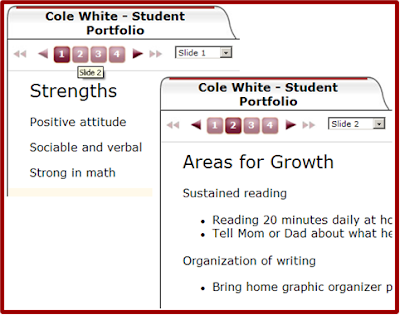
3. Once the template is complete, copy the template for each student and put each student’s name in the title of one of the copies.
4. As the year progresses, use the edit resource to add student projects, presentations, writing samples, report cards, teacher notes, even videos created in the classroom).
5. At conference time, click on the view to preview and present parents with a multi-media snapshot of what is really happening in the classroom and student progress.
This tool makes sense for electronic portfolios as it is extremely flexible, and it may be customized for each student as needed (e.g., IEP information, reteaching strategies implemented). Also, slides/categories may be added as the year moves forward. In addition, students who remain in the school system for consecutive years can place each year’s portfolio into a Dialog Book. Upon graduation, both the school and its students will have a powerful electronic record showing their hard work and progress across multiple years.
Try using Instructional Dialogs as a quick and easy electronic portfolio for student work.
1. Create a template for a student portfolio by creating a new Instructional Dialog.
2. Label each slide with a specific topic (e.g., Writing Samples, Multi-Test Reports, Strengths, Areas of Improvement).
1. Create a template for a student portfolio by creating a new Instructional Dialog.
2. Label each slide with a specific topic (e.g., Writing Samples, Multi-Test Reports, Strengths, Areas of Improvement).


3. Once the template is complete, copy the template for each student and put each student’s name in the title of one of the copies.
4. As the year progresses, use the edit resource to add student projects, presentations, writing samples, report cards, teacher notes, even videos created in the classroom).
5. At conference time, click on the view to preview and present parents with a multi-media snapshot of what is really happening in the classroom and student progress.
This tool makes sense for electronic portfolios as it is extremely flexible, and it may be customized for each student as needed (e.g., IEP information, reteaching strategies implemented). Also, slides/categories may be added as the year moves forward. In addition, students who remain in the school system for consecutive years can place each year’s portfolio into a Dialog Book. Upon graduation, both the school and its students will have a powerful electronic record showing their hard work and progress across multiple years.
Monday, April 11, 2011
What Makes An Engaging Multimedia Presentation?
Multimedia presentations can be defined as coordinated verbal and pictorial messages and research strongly supports the idea that students learn better from words and pictures than words alone (Mayer, R (2009), Multimedia Learning, 2nd edition, p 268). The research is preliminary, but it does suggest that well designed multimedia presentations work best when the material is complex and delivered at a rapid pace for the learner. This begs some questions, like what makes a well designed multimedia presentation? How fast is fast paced, would it differ from student to student? Is this a byproduct of the MTV generation? As opposed to trying to figure out a formula, Richard Mayer in Multimedia Learning (2009) has developed the cognitive theory of multimedia learning, which specifies-
• People have separate auditory and visual channels.
• These channels are limited in capacity.
• Meaningful learning involves actively selecting, organizing, and integrating incoming visual and auditory information.
So, how do we get all this information into and understood by these channels? Well, there are 12 principles to consider which break down into three types - principles that reduce extraneous processing, principles that manage essential processing, and principles that foster generative processing.
Principles That Reduce Extraneous Processing
• Coherence Principle - People learn better with extraneous works, pictures and sounds are excluded rather than included.
• Signaling Principle - People learn better when cues that highlight the organization of the essential material are added.
• Redundancy Principle - People learn better from graphics and narration that from graphics, narration and onscreen text.
• Spatial contiguity Principle - People learn better when corresponding words and pictures are presented near rather than far from each other on the page or screen.
• Temporal Contiguity Principle - People learn better when corresponding words and pictures are presented simultaneously rather than successively.
Principles That Manage Essential Processing
• Segmenting Principle - People learn better when a multimedia lesson is presented in user-paced segments rather than as a continuous unit.
• Pre-training Principle - People learn better from a multimedia lesson when they know the names and characteristics of the main concepts.
• Modality Principle - People learn better from graphics and narration than from graphics and on-screen text.
Principles That Foster Generative Processing
• Multimedia Principle - People learn better from words and pictures than from words alone.
• Personalization Principle - People learn better from multimedia lessons when words are in a conversational style rather than a formal style.
• Voice Principle - People learn better when the narration in multimedia is spoken in a friendly human voice rather than a machine voice.
• Image Principle - People do not necessarily learn better from a multimedia lesson when the speakers’ image is added to the screen.
Wow, that’s a lot of principles. These shouldn’t be viewed as a formula, but as recommendations to think about when creating multimedia presentations. ATI multimedia presentations in both Instructional Dialogs and assessment items have been built with these principles in mind.
-Dave Bergan
Senior Multimedia Specialist
• People have separate auditory and visual channels.
• These channels are limited in capacity.
• Meaningful learning involves actively selecting, organizing, and integrating incoming visual and auditory information.
So, how do we get all this information into and understood by these channels? Well, there are 12 principles to consider which break down into three types - principles that reduce extraneous processing, principles that manage essential processing, and principles that foster generative processing.
Principles That Reduce Extraneous Processing
• Coherence Principle - People learn better with extraneous works, pictures and sounds are excluded rather than included.
• Signaling Principle - People learn better when cues that highlight the organization of the essential material are added.
• Redundancy Principle - People learn better from graphics and narration that from graphics, narration and onscreen text.
• Spatial contiguity Principle - People learn better when corresponding words and pictures are presented near rather than far from each other on the page or screen.
• Temporal Contiguity Principle - People learn better when corresponding words and pictures are presented simultaneously rather than successively.
Principles That Manage Essential Processing
• Segmenting Principle - People learn better when a multimedia lesson is presented in user-paced segments rather than as a continuous unit.
• Pre-training Principle - People learn better from a multimedia lesson when they know the names and characteristics of the main concepts.
• Modality Principle - People learn better from graphics and narration than from graphics and on-screen text.
Principles That Foster Generative Processing
• Multimedia Principle - People learn better from words and pictures than from words alone.
• Personalization Principle - People learn better from multimedia lessons when words are in a conversational style rather than a formal style.
• Voice Principle - People learn better when the narration in multimedia is spoken in a friendly human voice rather than a machine voice.
• Image Principle - People do not necessarily learn better from a multimedia lesson when the speakers’ image is added to the screen.
Wow, that’s a lot of principles. These shouldn’t be viewed as a formula, but as recommendations to think about when creating multimedia presentations. ATI multimedia presentations in both Instructional Dialogs and assessment items have been built with these principles in mind.
-Dave Bergan
Senior Multimedia Specialist
Monday, April 4, 2011
Galileo Pre-K Technology - The First Integrated Educational Management System
Did you realize that Galileo technology is the first and most extensively integrated research-based online educational management system currently used in Head Start and other early childhood programs? Galileo Plus with Merlin supports a collaborative, data-driven, and goal-directed approach to promoting positive child outcomes.
Coming this summer: Galileo’s G3 Assessment Scales with fully integrated curriculum and reporting system directly articulated to the Head Start Child Development and Early Learning Framework.
Galileo is designed to facilitate a program-wide, systemic approach to local decision-making and action in leading to positive outcomes for children.
There are a number of ways to learn first-hand about Galileo Plus with Merlin. You can:
•visit the Assessment Technology Incorporated website (ati-online.com)
•participate in an online demonstration by registering either through the website or by calling 1.877.358.7611 to speak with a Field Services Coordinator
•you can visit us at the 38th National Head Start Training Conference April 4 through 8 at the Kansas City Convention Center in Kansas City, Missouri and/or at the Florida Head Start Training Conference April 25-29 at the Hilton Miami in Miami, Florida.
We look forward to communicating with you online or at the events.
Coming this summer: Galileo’s G3 Assessment Scales with fully integrated curriculum and reporting system directly articulated to the Head Start Child Development and Early Learning Framework.
Galileo is designed to facilitate a program-wide, systemic approach to local decision-making and action in leading to positive outcomes for children.
There are a number of ways to learn first-hand about Galileo Plus with Merlin. You can:
•visit the Assessment Technology Incorporated website (ati-online.com)
•participate in an online demonstration by registering either through the website or by calling 1.877.358.7611 to speak with a Field Services Coordinator
•you can visit us at the 38th National Head Start Training Conference April 4 through 8 at the Kansas City Convention Center in Kansas City, Missouri and/or at the Florida Head Start Training Conference April 25-29 at the Hilton Miami in Miami, Florida.
We look forward to communicating with you online or at the events.
Monday, March 14, 2011
ASK Technology
Would your District benefit from the ability to move your existing assessments of all types into a technology-based environment? ASK Technology allows you to import, schedule, administer online with optional use of response pads or bubble sheet responding, and automatically score the results for assessments originally developed external to Galileo K-12 Online technology. ASK Technology is especially useful for administering district end-of-chapter, -unit or -course assessments in higher grade levels.
We understand time is important and made sure that ASK Technology was designed to import pre-existing assessment content with ease. With ASK Technology districts can:
- Import Pre-Existing Assessment Content Anytime. Content may be imported immediately following Galileo implementation as well as at any point in the future. There is no need to design and schedule importation at one specific time or at a district level.
- Import a Variety of Content Formats. ASK Technology is compatible with a wide variety of content formats and can accommodate a wide variety of curricula. As long as tests can be saved to a common file type such as PDF, the tests can be imported using ASK Technology.
- Administer, Score, and View Pre-Existing Content Online. Since ASK tests are stored online, assessments can be administered, scored, reported on, and viewed online.
- Report on Pre-Existing Content Using Galileo Reporting Capabilities. Like all Galileo assessments, results from ASK assessments can be viewed in a wide variety of user-friendly reports, including those that involve item-level information. For example, a teacher examining the Detailed Item Analysis Report may notice that students are having difficulty with a particular item and wish to view the item to determine possible explanations for the difficulty. ASK Technology makes viewing the item online possible.
- Enable Psychometric Analyses of Pre-Existing Content. As with all Galileo assessments, when an ASK assessment is administered to a sufficiently large number of students, it is possible to conduct psychometric analyses to generate DL scores, place tests on a common scale, and update item characteristics such as item difficulty, item discrimination, and guessing. This type of information provides data on the extent to which items are contributing effectively to the measurement of student abilities being assessed.
- Align Pre-Existing Content to Standards. Pre-existing items can be aligned to standards using the ASK interface. In addition, when new standards are adopted, these items can easily be aligned to the new standards by simply selecting the appropriate new standard for each item within the ASK interface.
We would be happy to discuss with you the number of ways in which ASK Technology can help your District. Leave a comment on the post or give us a call at 1.877.442.5453. You can also sign up for an online overview on our website.
Thursday, March 3, 2011
Instructional Dialogs
I can still remember sitting in my middle school history classes as Mr. C. went through overhead transparency after overhead transparency as I quickly attempted to get everything written down in my notes. I was able to record almost every single word about Mesopotamia, but did I actually LEARN any of it? Or was I simply trying to do my best impression of a court stenographer? Even worse, two weeks later when it came time to study for the unit test on early civilizations, I couldn't read half my notes because my hands had cramped during frantic note taking.
I hated taking notes in that class, and the worst part was if you were caught talking or being a general classroom nuisance then you got to spend time at lunch or after school cleaning the stacks and stacks of used transparency sheets covered in Vis-A-Vis markers. I remember it all too well. Technology advanced and soon I was sitting in high school history class. There I was desperately trying to keep up with Mr. V. and his presentations. We've all seen these boring presentations.
On the plus side, there were fewer transparency sheets to clean at the end of the day (however there was plenty of gum underneath the desks, but that's a whole other story). While the way the information was given had changed, the end result was pretty much the same. If a student was unable to get the notes, if they were absent, if they left their backpack on the bus, they didn't have the notes ready to study.
If only there was a way for teachers to be able to present information to students in a fashion they are familiar and comfortable with, while making it easier to retain the information and have the notes handy, without the dreaded, crippling, wrist cramp.
DIALOGS!
You may or may not be aware of Galileo's Instructional Dialog technology. These are slide-based instructional pieces located in Galileo K-12 Online. Dialogs are currently available for use within Galileo, but you can also make your own.
What is the benefit of creating a Dialog to use in the classroom?
• Dialogs are online - Galileo Dialogs are available to you regardless of which computer you are using to access it.
• Dialogs are available - Your students can log into Galileo and pull up the Dialog that you've created. They can review their notes before a test and focus more on what the teacher is teaching during the class rather than stressing to jot down every last word and letter before you switch the slide.
• Dialogs are standards-based - The first step in creating a Dialog is aligning it to a standard or standards. This makes it easy for you to go in after the fact and find the Dialog because you know what is being taught.
• Dialogs are interactive - You can even add a quick quiz at the end or add question slides in the Dialog to guide any classroom discussion of the topic at hand.
• Dialogs are multimedia - There are many options to add media to Dialogs. You can add pictures, videos, graphs, clip art, as well as links to other games, videos, etc., that are already out on the Internet.
Galileo Dialog

-Chris Domschke
Field Services Coordinator
I hated taking notes in that class, and the worst part was if you were caught talking or being a general classroom nuisance then you got to spend time at lunch or after school cleaning the stacks and stacks of used transparency sheets covered in Vis-A-Vis markers. I remember it all too well. Technology advanced and soon I was sitting in high school history class. There I was desperately trying to keep up with Mr. V. and his presentations. We've all seen these boring presentations.
On the plus side, there were fewer transparency sheets to clean at the end of the day (however there was plenty of gum underneath the desks, but that's a whole other story). While the way the information was given had changed, the end result was pretty much the same. If a student was unable to get the notes, if they were absent, if they left their backpack on the bus, they didn't have the notes ready to study.
If only there was a way for teachers to be able to present information to students in a fashion they are familiar and comfortable with, while making it easier to retain the information and have the notes handy, without the dreaded, crippling, wrist cramp.
DIALOGS!
You may or may not be aware of Galileo's Instructional Dialog technology. These are slide-based instructional pieces located in Galileo K-12 Online. Dialogs are currently available for use within Galileo, but you can also make your own.
What is the benefit of creating a Dialog to use in the classroom?
• Dialogs are online - Galileo Dialogs are available to you regardless of which computer you are using to access it.
• Dialogs are available - Your students can log into Galileo and pull up the Dialog that you've created. They can review their notes before a test and focus more on what the teacher is teaching during the class rather than stressing to jot down every last word and letter before you switch the slide.
• Dialogs are standards-based - The first step in creating a Dialog is aligning it to a standard or standards. This makes it easy for you to go in after the fact and find the Dialog because you know what is being taught.
• Dialogs are interactive - You can even add a quick quiz at the end or add question slides in the Dialog to guide any classroom discussion of the topic at hand.
• Dialogs are multimedia - There are many options to add media to Dialogs. You can add pictures, videos, graphs, clip art, as well as links to other games, videos, etc., that are already out on the Internet.
Galileo Dialog
(Click the image above to open a Galileo K-12 Online Dialog)
-Chris Domschke
Field Services Coordinator
Monday, February 28, 2011
Formative Assessments – Part of ATI’s Comprehensive Assessment System – on exhibit during March in Arizona, Missouri, and Washington
The Common Core State Standards initiative set by the National Governors Association Center for Best Practices (NGA Center) and the Council of Chief State School Officers (CCSSO) was created to develop - in collaboration with teachers, school administrators, and experts - a clear and consistent framework to prepare our children for college and for the workforce.
The goal of preparing our children for success in college and in the workforce can be most easily achieved when valid and reliable information is used to inform education decisions. These decisions greatly influence the learning opportunities made available to our children. The reliable data we so heavily rely on can come from a complete standards-based comprehensive assessment system. Many types of assessments make up a comprehensive assessment system, one of which is formative assessment.
Formative assessments, like benchmarks, are designed to provide information to guide instruction. They may include minute-by-minute teaching adjustments based on assessments that are a part of the instructional process. They may also include quizzes designed to measure the mastery of standards currently targeted for instruction in the classroom. Or they may even include short, common assessments directed at specific standards selected for instruction in a large-scale intervention. The bottom line: Formative assessments can provide the data you are looking for when making decisions to inform instruction.
There are a number of ways to learn first-hand about the ways formative assessments can provide the data you need. You can visit the Assessment Technology Incorporated website, participate in an online demonstration by visiting the site or by calling 1.877.442.5453, or you can visit us at any one of many events during the year. The next few events ATI will be attending are the Missouri Association of Elementary School Principals (MAESP) Annual Spring Conference March 12 through the 14 at the Tan-Tar-A-Resort in Osage Beach, Missouri; the Microcomputers in Education (MEC) 2011 Conference March 14 through the 16 at the Arizona State University in Tempe, Arizona; or the Washington Association of School Administrators (WASA) March 14 and 15 at the Wenatchee Convention Center in Wenatchee, Washington.
We look forward to communicating with you online, over the phone, or at an upcoming event.
Subscribe to:
Posts (Atom)