As is well known, there is a steadily growing effort across many states to develop legislation and task force guidance to help facilitate the design and implementation of local school district educator effectiveness initiatives. Illustrative examples of these efforts can be gleaned from Arizona Senate Bill 1040 and the Arizona Framework for Measuring Educator Effectiveness, Colorado Senate Bill 10-191 and the State Council for Educator Effectiveness, The Massachusetts Task Force on the Evaluation of Teachers and Administrators, and California Assembly Bill 5, to name a few.
The common themes undergirding these initiatives are ensuring that: 1) all students have effective teachers in the classroom and effective leaders in their schools; 2) all teachers and school leaders have access to high-quality professional development, best practices, and standards-based, data-driven systems to promote effective, systemic decision-making leading to increased student mastery of standards; and 3) local effectiveness initiatives have clear expectations and are supported by multiple, fair, transparent, timely, rigorous, reliable, and valid methods of assessing student, teacher, and principal performance.
Over the past year, a number of school districts and charter schools across several states have asked Assessment Technology Incorporated (ATI) to explore ways in which ATI can support local implementation of educator effectiveness initiatives through the implementation of the Comprehensive Assessment System approach inherent in the Galileo K-12 Online Instructional Improvement System. More specifically, the request has been to explore ways in which Galileo can be utilized to: 1) provide reliable and valid quantitative data on student academic progress which can be used to facilitate instructional effectiveness initiatives aimed at supporting professional development and best practices that enhance student learning; 2) provide an integrated mechanism for evaluating instructional effectiveness and expectations of student learning and growth in the context of diverse factors such as student mobility, attendance, and high-risk student populations; 3) provide a means to gather, analyze, and report information on student learning through Galileo pre and posttest designs in state-tested subjects (e.g., mathematics, English language arts, and science), as well as for non-tested subjects (e.g., history, arts, physical education); and 4) partner with districts in ways that make it possible to use Galileo technology to gather, analyze, and report classroom and school observational walkthroughs, interview and survey data of interest to local school district stakeholders.
ATI has designed a set of assessment, reporting, and instructional tools within Galileo K-12 Online that can be used to help facilitate locally designed instructional effectiveness initiatives. Our plan is to work in collaboration with districts and charter schools to implement a pilot of these tools during the 2011-2012 school year as part of the Galileo Implementation Plan, with the goal of achieving full implementation beginning in the 2012-2013 school year. School districts and charter schools not currently implementing Galileo and with an interest in learning more about this pilot are encouraged to contact us to obtain more information regarding pilot implementation.
Typical questions that we have received from the field and for which we can provide detailed information include:
• What grade levels and content areas will be covered by ATI student assessments?
• What will the assessments look like?
• When should we plan on administering the assessments?
• When can we expect delivery of the assessments for use in the pilot year (fall, 2011)?
• What kind of analyses will be applied to the student scores?
• What kind of reports can we expect?
We welcome the opportunity to hear from you and to discuss in more detail the benefits of the ATI “instructional effectiveness assessment approach” in supporting local implementation of educator effectiveness initiatives. Our Field Services and Research teams are also available to provide guidance and information about the critical issues to be considered in measuring instructional effectiveness and student progress, the importance of reliability and validity in measurement, and an overview of the hierarchical linear modeling (HLM) and categorical data analysis (CDA) procedures we plan to implement to help guide local decision-making in support of best practices and student learning.
Jason K. Feld, Ph.D.
Vice President, Corporate Projects.

Tuesday, May 31, 2011

Monday, May 23, 2011
Instructional Dialogs: Customized, Interactive, Online Lessons and Assignments
Designed to provide practice and instruction to increase standards mastery in reading/language arts, mathematics, and science, Instructional Dialogs are customized, interactive, online instructional lessons and assignments aligned to state standards.
Galileo K-12 Online currently includes over 1,600 Instructional Dialogs and additional Instructional Dialogs are developed on an ongoing basis by ATI’s experienced Assessment and Instructional Design staff. As standards change, ATI Instructional Dialogs are remapped to the appropriate new standard. For example, ATI is currently aligning Instructional Dialogs to the Common Core State Standards.
Each Instructional Dialog is a series of slides that can be used as a teacher-led lesson for the entire class or as an independent assignment used by an individual student or group of students. Dialogs are designed to take advantage of the best instructional practice available and may be customized to reflect whatever format for instruction the educational system chooses.
See a sample Instructional Dialog here.
Galileo K-12 Online currently includes over 1,600 Instructional Dialogs and additional Instructional Dialogs are developed on an ongoing basis by ATI’s experienced Assessment and Instructional Design staff. As standards change, ATI Instructional Dialogs are remapped to the appropriate new standard. For example, ATI is currently aligning Instructional Dialogs to the Common Core State Standards.
Each Instructional Dialog is a series of slides that can be used as a teacher-led lesson for the entire class or as an independent assignment used by an individual student or group of students. Dialogs are designed to take advantage of the best instructional practice available and may be customized to reflect whatever format for instruction the educational system chooses.
See a sample Instructional Dialog here.
Monday, May 9, 2011
The Delivery and Moving of ATI-created Tests in Galileo
For each district administering ATI-created tests, such as assessments created from the Assessment Planner or the CBAS (Comprehensive Benchmark Assessment Series) assessments, ATI will create a “secure library” in which to house the assessments. Typically, the library will have the school year, district name and “secure library” in the title. For example, “10-11 Desert Dwellers Secure Library.” The assessments that a district has ordered will be delivered to this library. All district-level users are provided “write” access to this library.
From this secure library, a district-level user will be able to schedule the assessments and print test materials. Students will be able to take the assessments online, and users can scan the answer sheets that accompany offline assessments. Only district –level users will be able to see the assessments online outside of the testing window, view the results of assessments, or run reports on content housed in the secure library.
If the security of the assessment is of great concern then you will want to leave the assessment in the secure library before and during test administration.
ATI not only creates a “secure library” in which to house the assessments, but also creates a library (which for the purposes of this blog, we will call a “Community library”) for each grade-level that will be taking an assessment. This library is typically titled with the year, the grade-level, the district name and the assessment type, such as “Benchmark.” For example, “10-11 Desert Dwellers 6th Grade Benchmark Library.” All users in the district will have read-access to this library. From this library all users may schedule the assessment, students will be able to take the assessments online, and users can scan the answer sheets that accompany offline assessments. When content is in this public library, users may also print test materials, access the test items, view the assessment results and run reports.
If you would like educators in your district to have access to this assessment data, we recommend moving the assessments from the “secure library” to the appropriate community library. At any time you may move assessments back to secure library to restrict access to the test items and the assessment data.
Based on the level of security your assessment approach necessitates, where in Galileo do you house you assessments before, during and after testing? How and under what guidelines do you transition the assessments between the Secure and Community libraries?
From this secure library, a district-level user will be able to schedule the assessments and print test materials. Students will be able to take the assessments online, and users can scan the answer sheets that accompany offline assessments. Only district –level users will be able to see the assessments online outside of the testing window, view the results of assessments, or run reports on content housed in the secure library.
If the security of the assessment is of great concern then you will want to leave the assessment in the secure library before and during test administration.
ATI not only creates a “secure library” in which to house the assessments, but also creates a library (which for the purposes of this blog, we will call a “Community library”) for each grade-level that will be taking an assessment. This library is typically titled with the year, the grade-level, the district name and the assessment type, such as “Benchmark.” For example, “10-11 Desert Dwellers 6th Grade Benchmark Library.” All users in the district will have read-access to this library. From this library all users may schedule the assessment, students will be able to take the assessments online, and users can scan the answer sheets that accompany offline assessments. When content is in this public library, users may also print test materials, access the test items, view the assessment results and run reports.
If you would like educators in your district to have access to this assessment data, we recommend moving the assessments from the “secure library” to the appropriate community library. At any time you may move assessments back to secure library to restrict access to the test items and the assessment data.
Based on the level of security your assessment approach necessitates, where in Galileo do you house you assessments before, during and after testing? How and under what guidelines do you transition the assessments between the Secure and Community libraries?
Monday, May 2, 2011
Looking for One System to Help You with the Goals of Increasing Student Performance and Teacher Effectiveness?
The question that is on the minds of most educators these days is whether there really is one innovative solution that helps increase student performance and teacher effectiveness? The answer is simply Yes. Galileo K-12 Online is a robust system that provides the technology to do just that.
Galileo’s Instructional Improvement System provides the tools where users can:
• Administer a full range of assessments using ATI’s comprehensive assessment system, including benchmark, formative, screening and placement tests, plus interim and final course examinations, pretests and posttests, and instruments documenting instructional effectiveness.
• Evaluate instruction based on reliable and valid assessment information including continuously updated forecasts of student achievement on statewide tests.
• Use Item Response Theory generated assessment information to guide classroom instruction, enrichment, and reteaching interventions.
• Receive immediate assessment feedback providing the ability to track student progress towards standards mastery and inform instructional decisions with Galileo’s actionable reporting engine.
• Elevate student achievement by using Galileo benchmark assessment data to inform instruction. A recent study, called for by the Massachusetts Department of Education and completed by MAGI Services, evaluated the use of Galileo K-12 Online and revealed that when teachers used Galileo benchmark data to guide instruction, achievement was enhanced.
Experience Galileo for yourself. There are a number of ways to learn first-hand about Galileo K-12 Online. You can:
• visit the Assessment Technology Incorporated website (ati-online.com)
• participate in an online demonstration by registering either through the website or by calling 1.877.442.5453 to speak with a Field Services Coordinator
• visit us at the Illinois Association of School Business Officials 60th Annual Conference May 18 through 19 at the Pheasant Run Resort in St. Charles, Illinois and the Arizona Department of Education Leading the Change Conference June 27 through 29 at the Westin La Paloma in Tucson, Arizona.
We look forward to communicating with you online or at events.
Galileo’s Instructional Improvement System provides the tools where users can:
• Administer a full range of assessments using ATI’s comprehensive assessment system, including benchmark, formative, screening and placement tests, plus interim and final course examinations, pretests and posttests, and instruments documenting instructional effectiveness.
• Evaluate instruction based on reliable and valid assessment information including continuously updated forecasts of student achievement on statewide tests.
• Use Item Response Theory generated assessment information to guide classroom instruction, enrichment, and reteaching interventions.
• Receive immediate assessment feedback providing the ability to track student progress towards standards mastery and inform instructional decisions with Galileo’s actionable reporting engine.
• Elevate student achievement by using Galileo benchmark assessment data to inform instruction. A recent study, called for by the Massachusetts Department of Education and completed by MAGI Services, evaluated the use of Galileo K-12 Online and revealed that when teachers used Galileo benchmark data to guide instruction, achievement was enhanced.
Experience Galileo for yourself. There are a number of ways to learn first-hand about Galileo K-12 Online. You can:
• visit the Assessment Technology Incorporated website (ati-online.com)
• participate in an online demonstration by registering either through the website or by calling 1.877.442.5453 to speak with a Field Services Coordinator
• visit us at the Illinois Association of School Business Officials 60th Annual Conference May 18 through 19 at the Pheasant Run Resort in St. Charles, Illinois and the Arizona Department of Education Leading the Change Conference June 27 through 29 at the Westin La Paloma in Tucson, Arizona.
We look forward to communicating with you online or at events.
Monday, April 25, 2011
ATI’s Approach to Comprehensive Assessment
A well-designed comprehensive assessment system includes many different types of assessment serving the needs of students from preschool to the 12th grade. The various assessment types serve different purposes and provide many benefits. ATI’s comprehensive assessment system includes benchmark, formative, screening and placement tests, plus interim and final course examinations, pretests and posttests, computerized adaptive tests, and instruments documenting instructional effectiveness. Perhaps the most important benefit of a comprehensive assessment system is that it supports the ability to adapt to continuous change.
Benefits of a Comprehensive Assessment System
Comprehensive assessment systems hold the promise of providing beneficial changes in the ways in which assessment is used in education. Perhaps the most significant change is the increase that a comprehensive system can provide in the amount of information available to improve education.
• In a comprehensive system, results from a variety of assessments can be placed on a common scale. The use of a common scale makes is possible to directly compare results from different assessments, offering a more complete picture of academic accomplishments.
• A comprehensive assessment system can also increase assessment efficiency. In ATI’s comprehensive system, a technology platform common across assessment types is developed to facilitate implementation of the system. The platform includes artificial intelligence routines that guide the construction, review, publication, security, scheduling, administration, and scoring of tests, plus psychometric analyses, reporting, and the provision of actionable decision options.
• A comprehensive system also provides system monitoring tools that make it possible to guide system implementation. These tools include information regarding when tests have been constructed, reviewed, revised, and delivered. Monitoring information also provides data on the extent to which different types of assessment are used. This information can be used to guide the development and refinement of a comprehensive customized assessment strategy.
View ATI’s White Paper on Comprehensive Assessment.
This white paper, prepared by ATI, gives a more detailed discussion of the major types of assessments included in a comprehensive system, the purposes of each type of assessment, and the characteristics and procedures required to ensure the effective implementation of each type of assessment.
Benefits of a Comprehensive Assessment System
Comprehensive assessment systems hold the promise of providing beneficial changes in the ways in which assessment is used in education. Perhaps the most significant change is the increase that a comprehensive system can provide in the amount of information available to improve education.
• In a comprehensive system, results from a variety of assessments can be placed on a common scale. The use of a common scale makes is possible to directly compare results from different assessments, offering a more complete picture of academic accomplishments.
• A comprehensive assessment system can also increase assessment efficiency. In ATI’s comprehensive system, a technology platform common across assessment types is developed to facilitate implementation of the system. The platform includes artificial intelligence routines that guide the construction, review, publication, security, scheduling, administration, and scoring of tests, plus psychometric analyses, reporting, and the provision of actionable decision options.
• A comprehensive system also provides system monitoring tools that make it possible to guide system implementation. These tools include information regarding when tests have been constructed, reviewed, revised, and delivered. Monitoring information also provides data on the extent to which different types of assessment are used. This information can be used to guide the development and refinement of a comprehensive customized assessment strategy.
View ATI’s White Paper on Comprehensive Assessment.
This white paper, prepared by ATI, gives a more detailed discussion of the major types of assessments included in a comprehensive system, the purposes of each type of assessment, and the characteristics and procedures required to ensure the effective implementation of each type of assessment.
Monday, April 18, 2011
Electronic Student Portfolios
Another Great Use for Instructional Dialogs
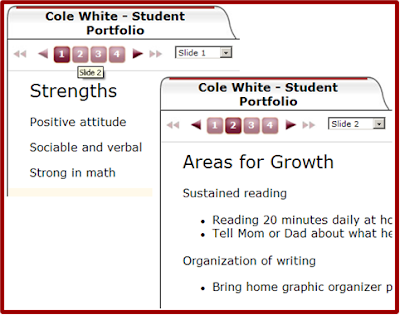
3. Once the template is complete, copy the template for each student and put each student’s name in the title of one of the copies.
4. As the year progresses, use the edit resource to add student projects, presentations, writing samples, report cards, teacher notes, even videos created in the classroom).
5. At conference time, click on the view to preview and present parents with a multi-media snapshot of what is really happening in the classroom and student progress.
This tool makes sense for electronic portfolios as it is extremely flexible, and it may be customized for each student as needed (e.g., IEP information, reteaching strategies implemented). Also, slides/categories may be added as the year moves forward. In addition, students who remain in the school system for consecutive years can place each year’s portfolio into a Dialog Book. Upon graduation, both the school and its students will have a powerful electronic record showing their hard work and progress across multiple years.
Try using Instructional Dialogs as a quick and easy electronic portfolio for student work.
1. Create a template for a student portfolio by creating a new Instructional Dialog.
2. Label each slide with a specific topic (e.g., Writing Samples, Multi-Test Reports, Strengths, Areas of Improvement).
1. Create a template for a student portfolio by creating a new Instructional Dialog.
2. Label each slide with a specific topic (e.g., Writing Samples, Multi-Test Reports, Strengths, Areas of Improvement).


3. Once the template is complete, copy the template for each student and put each student’s name in the title of one of the copies.
4. As the year progresses, use the edit resource to add student projects, presentations, writing samples, report cards, teacher notes, even videos created in the classroom).
5. At conference time, click on the view to preview and present parents with a multi-media snapshot of what is really happening in the classroom and student progress.
This tool makes sense for electronic portfolios as it is extremely flexible, and it may be customized for each student as needed (e.g., IEP information, reteaching strategies implemented). Also, slides/categories may be added as the year moves forward. In addition, students who remain in the school system for consecutive years can place each year’s portfolio into a Dialog Book. Upon graduation, both the school and its students will have a powerful electronic record showing their hard work and progress across multiple years.
Monday, April 11, 2011
What Makes An Engaging Multimedia Presentation?
Multimedia presentations can be defined as coordinated verbal and pictorial messages and research strongly supports the idea that students learn better from words and pictures than words alone (Mayer, R (2009), Multimedia Learning, 2nd edition, p 268). The research is preliminary, but it does suggest that well designed multimedia presentations work best when the material is complex and delivered at a rapid pace for the learner. This begs some questions, like what makes a well designed multimedia presentation? How fast is fast paced, would it differ from student to student? Is this a byproduct of the MTV generation? As opposed to trying to figure out a formula, Richard Mayer in Multimedia Learning (2009) has developed the cognitive theory of multimedia learning, which specifies-
• People have separate auditory and visual channels.
• These channels are limited in capacity.
• Meaningful learning involves actively selecting, organizing, and integrating incoming visual and auditory information.
So, how do we get all this information into and understood by these channels? Well, there are 12 principles to consider which break down into three types - principles that reduce extraneous processing, principles that manage essential processing, and principles that foster generative processing.
Principles That Reduce Extraneous Processing
• Coherence Principle - People learn better with extraneous works, pictures and sounds are excluded rather than included.
• Signaling Principle - People learn better when cues that highlight the organization of the essential material are added.
• Redundancy Principle - People learn better from graphics and narration that from graphics, narration and onscreen text.
• Spatial contiguity Principle - People learn better when corresponding words and pictures are presented near rather than far from each other on the page or screen.
• Temporal Contiguity Principle - People learn better when corresponding words and pictures are presented simultaneously rather than successively.
Principles That Manage Essential Processing
• Segmenting Principle - People learn better when a multimedia lesson is presented in user-paced segments rather than as a continuous unit.
• Pre-training Principle - People learn better from a multimedia lesson when they know the names and characteristics of the main concepts.
• Modality Principle - People learn better from graphics and narration than from graphics and on-screen text.
Principles That Foster Generative Processing
• Multimedia Principle - People learn better from words and pictures than from words alone.
• Personalization Principle - People learn better from multimedia lessons when words are in a conversational style rather than a formal style.
• Voice Principle - People learn better when the narration in multimedia is spoken in a friendly human voice rather than a machine voice.
• Image Principle - People do not necessarily learn better from a multimedia lesson when the speakers’ image is added to the screen.
Wow, that’s a lot of principles. These shouldn’t be viewed as a formula, but as recommendations to think about when creating multimedia presentations. ATI multimedia presentations in both Instructional Dialogs and assessment items have been built with these principles in mind.
-Dave Bergan
Senior Multimedia Specialist
• People have separate auditory and visual channels.
• These channels are limited in capacity.
• Meaningful learning involves actively selecting, organizing, and integrating incoming visual and auditory information.
So, how do we get all this information into and understood by these channels? Well, there are 12 principles to consider which break down into three types - principles that reduce extraneous processing, principles that manage essential processing, and principles that foster generative processing.
Principles That Reduce Extraneous Processing
• Coherence Principle - People learn better with extraneous works, pictures and sounds are excluded rather than included.
• Signaling Principle - People learn better when cues that highlight the organization of the essential material are added.
• Redundancy Principle - People learn better from graphics and narration that from graphics, narration and onscreen text.
• Spatial contiguity Principle - People learn better when corresponding words and pictures are presented near rather than far from each other on the page or screen.
• Temporal Contiguity Principle - People learn better when corresponding words and pictures are presented simultaneously rather than successively.
Principles That Manage Essential Processing
• Segmenting Principle - People learn better when a multimedia lesson is presented in user-paced segments rather than as a continuous unit.
• Pre-training Principle - People learn better from a multimedia lesson when they know the names and characteristics of the main concepts.
• Modality Principle - People learn better from graphics and narration than from graphics and on-screen text.
Principles That Foster Generative Processing
• Multimedia Principle - People learn better from words and pictures than from words alone.
• Personalization Principle - People learn better from multimedia lessons when words are in a conversational style rather than a formal style.
• Voice Principle - People learn better when the narration in multimedia is spoken in a friendly human voice rather than a machine voice.
• Image Principle - People do not necessarily learn better from a multimedia lesson when the speakers’ image is added to the screen.
Wow, that’s a lot of principles. These shouldn’t be viewed as a formula, but as recommendations to think about when creating multimedia presentations. ATI multimedia presentations in both Instructional Dialogs and assessment items have been built with these principles in mind.
-Dave Bergan
Senior Multimedia Specialist
Subscribe to:
Posts (Atom)