There is widespread agreement that in order to continue to be competitive in the global society in which we live, we must elevate student achievement significantly beyond current levels. The current national commitment to elevating student achievement is apparent in the Federal Race to the Top initiative which commits over four billion dollars to the national effort to increase student achievement.
We have certainly not reached the point where we can say that we have solved the problem of how to significantly increase student achievement. We will not be able to make that claim until the goal of increasing achievement has been realized. Yet, there is evidence regarding what works to elevate achievement. Moreover, the evidence suggests that the solution to the problem of elevating achievement can be rather straight forward.
There is evidence suggesting that one effective way to elevate student achievement is to administer a series of interim benchmark assessments aligned to academic standards and to the district curriculum and to use the results of each benchmark to re-teach the skills that students have not yet mastered. The Massachusetts Department of Education commissioned MAGI Services to conduct a study evaluating the use of ATI’s Galileo K-12 Online to elevate achievement. The study revealed that when teachers used Galileo benchmark assessments to guide instruction achievement was enhanced. This finding was not surprising to us. Nearly twenty years ago we conducted a study published in 1991 in the American Educational Research Journal that revealed findings consistent with those found in the MAGI Services study. We also note that for many years, WestEd has emphasized the importance of using interim assessments to guide instruction in its Local Accountability Professional Development Series. A number of “success stories” have also emerged that support re-teaching based on benchmark results. The remarkable success of the Vail Unified School District in Arizona is an example. Many other examples are beginning to emerge.
We believe that interim benchmark assessment can play an important role in elevating achievement in the years ahead. In this connection, we were delighted to find support for re-teaching utilizing interim benchmark assessment results and results from other assessments in the information provided in the Federal Register regarding the Race to the Top initiative. The Federal Register information on the Race to the Top program defines interim assessments, discusses the importance of establishing the reliability and validity of these assessments, and describes their use in guiding instructional decisions. A policy brief on the role of interim assessments in a comprehensive assessment system prepared jointly by the National Center for the Improvement of Educational Assessment and the Aspen Institute attests further to the growing recognition of the importance of interim benchmark assessments in guiding instructional decisions.
Given the straightforward nature of the approach and the growing body of evidence supporting its use, it would seem that jumping on the interim assessment bandwagon would not be a bad idea. We at ATI certainly agree. We have been developing interim benchmark assessments for use in guiding instruction for several years. However, deciding to use interim assessments to guide instruction is a bit like deciding to lose weight. It’s simple. Eat less, or if you want a complicated version, eat less and exercise more. Yet, losing weight is easier said than done. That is also the case with respect to using benchmark assessment to guide instruction.
Recently in a presentation to the Arizona Educational Research Organization (AERO), we initiated a discussion of the critical characteristics of interim benchmark assessments, the management technology needed to support an interim assessment initiative, the challenges associated with implementing such an initiative, and ways of addressing those challenges. You can find the presentation on our website. In the weeks and months ahead, we will be presenting success stories from a number of districts that will inform the discussion. The first of these recounts the remarkable achievements of the Laveen Elementary School District located in Laveen Arizona. This district achieved increases in the percentage of students meeting standards on the Arizona statewide test AIMS at every grade.
Stay tuned and give us your two cents. I know it’s not four billion dollars, but we still value it, and I am sure that the school districts meeting the challenge to elevate student achievement will value it too.

Wednesday, November 11, 2009

Monday, October 26, 2009
Creating A Secure Test Environment
As computer-based testing becomes more common and the students participating are increasingly computer-savvy, the security landscape changes. Where teachers used to be solely responsible for security, schools now ensure the integrity of tests with additional input from the district IS/IT department.
A secure testing environment can be created in a number of ways. The principles are similar to those applied to any classroom or lab with student-used computers – situations where access to the district LAN and Internet is limited and/or monitored. Many districts find that the creation of a secure testing environment relies on methods and tools already in place, with little modification.
The principles of creating a secure environment apply equally to an Internet-based or LAN-based testing scenario. If access to non-testing websites, servers, and applications is not restricted during the testing session, the opportunity to inappropriately access and/or share information is still present. A properly secured testing environment will achieve the desired result of ensuring accurate assessment of student knowledge whether the test server is accessed through the Internet or over the district LAN.
To read more about the principles of creating a secure testing environment, please go to http://www.ati-online.com/pdfs/SecureTestEnvironmentGuidelines.pdf.
A secure testing environment can be created in a number of ways. The principles are similar to those applied to any classroom or lab with student-used computers – situations where access to the district LAN and Internet is limited and/or monitored. Many districts find that the creation of a secure testing environment relies on methods and tools already in place, with little modification.
The principles of creating a secure environment apply equally to an Internet-based or LAN-based testing scenario. If access to non-testing websites, servers, and applications is not restricted during the testing session, the opportunity to inappropriately access and/or share information is still present. A properly secured testing environment will achieve the desired result of ensuring accurate assessment of student knowledge whether the test server is accessed through the Internet or over the district LAN.
To read more about the principles of creating a secure testing environment, please go to http://www.ati-online.com/pdfs/SecureTestEnvironmentGuidelines.pdf.
Monday, October 12, 2009
Create Formative Assessments for ATI Item Families
Did you know that you can easily search ATI’s Formative Item Bank for items related to specific item families? An item family is a text or image to which test questions (items) may be attached. Galileo has libraries of item families that are linked to test questions.
Typically when a user builds a test in Galileo they do so by searching on specific learning standards to generate a test that assesses those particular standards. It is possible however to build a test by searching on an item family, reviewing all the questions linked to that item family, and selecting items to be on your test. Searching by item family is a benefit in that the process can be used to restrict the number of readings required for the measurement of specific standards of interest. Below you will find instructions on how to do this.
Test Status
15. Click on the Test Status link.
16. Select the Published phase by clicking on the radio button.
17. Determine if you would like this to be a Formative Test or Formative Protected Test.
18. To save your selection, click on the Save Test Status button.
Typically when a user builds a test in Galileo they do so by searching on specific learning standards to generate a test that assesses those particular standards. It is possible however to build a test by searching on an item family, reviewing all the questions linked to that item family, and selecting items to be on your test. Searching by item family is a benefit in that the process can be used to restrict the number of readings required for the measurement of specific standards of interest. Below you will find instructions on how to do this.
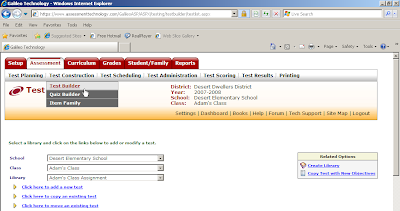
1. When you first log in, click on the Assessment tab in the red menu bar at the top of the page.
2.Click on the Test Builder link under Test Construction in the gray menu bar at the top of your screen.
3. Use the down arrow on the Class drop-down menu to select the class for which you would like to build a test.
4. Use the down arrow on the Library drop-down menu to select the library that will store the test you wish to build.
5. Click on the Click here to add a new test link. You will be brought to a new page.
6. Enter in your test title.
7. Select the grade level.
8. Click on the Save > button.
Search Item Banks for Test Items
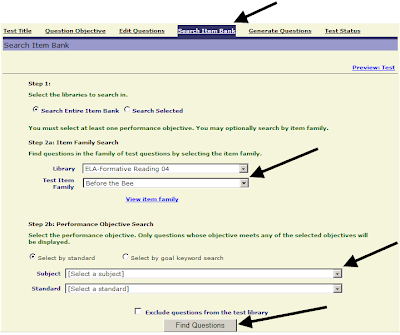
With Galileo Online Test Builder you may search the item bank to find test items that articulate directly to the item families you have selected.
9. Click on the Search Item Bank link.
10. Select the Formative Library for the grade-level for which you wish to build a test.
11. Select an item family. You may preview this item family by clicking on the View Item family link. A pop-up window will appear that displays the item family in its entirety.
12. Click on the Find Questions button at the bottom of the screen. A list of test items that articulate to that item story will appear. Click in the checkbox of the test item(s) you would like to include on your test.
13. Click on the Add Questions to Test button.
14. You now have a test to give to students that focuses on an Item Family. Simply publish the Test and schedule it with students.
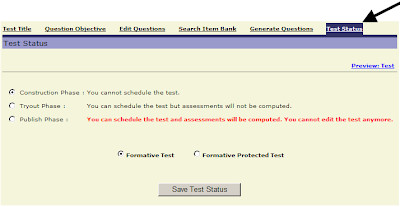
Test Status
15. Click on the Test Status link.
16. Select the Published phase by clicking on the radio button.
17. Determine if you would like this to be a Formative Test or Formative Protected Test.
18. To save your selection, click on the Save Test Status button.
Wednesday, October 7, 2009
Assessment Based on Instruction or the Benchmark Assessment Series?
Should students be assessed based only on instruction provided during the benchmark period or should all grade-level standards be assessed on each benchmark? This question is asked frequently by ATI clients.
ATI recommends that school districts assess students on standards targeted for instruction if:
· There is an established pacing guide. The school district has a relatively large number of students who will be taking each test. The school district has a pacing guide that includes instruction on all state-tested standards.
There are two particularly important benefits associated with the approach of aligning assessments with a pacing calendar: First, students are assessed only on material that they have been recently taught. Second, it is typically possible to include more items on each standard being assessed than would otherwise be the case. This increases the amount of information on student performance available for each standard that is assessed.
In contrast, when a school district has many different pacing guides, there are challenges associated with the attempt to align assessment with what is currently targeted for instruction. Disagreements about which standards should be assessed on which benchmarks tend to surface when teachers are not all on the same page. It is difficult to make decisions about which classrooms and pacing guides should take precedence over the others.
In addition, analyzing data and making predictions on how students will do on a high stakes tests is most effective when large numbers of students take an assessment. There is an adverse effect on the stability of item parameter estimates used in determining item difficulty, discrimination, and guessing. With many different pacing guides, the numbers of students taking each assessment decreases.
ATI offers an alternative for school districts that don’t have a widely used pacing guide in place or who would only have small number of students taking each assessment. The Benchmark Assessment Series assesses all grade level standards thereby providing Development Level information for students no matter what pacing guide their teachers are following, allows a greater number of students to take the same assessment, and will pinpoint areas where large groups of students have not mastered concepts which will be assessed on the state tests.
ATI recommends that school districts assess students on standards targeted for instruction if:
· There is an established pacing guide. The school district has a relatively large number of students who will be taking each test. The school district has a pacing guide that includes instruction on all state-tested standards.
There are two particularly important benefits associated with the approach of aligning assessments with a pacing calendar: First, students are assessed only on material that they have been recently taught. Second, it is typically possible to include more items on each standard being assessed than would otherwise be the case. This increases the amount of information on student performance available for each standard that is assessed.
In contrast, when a school district has many different pacing guides, there are challenges associated with the attempt to align assessment with what is currently targeted for instruction. Disagreements about which standards should be assessed on which benchmarks tend to surface when teachers are not all on the same page. It is difficult to make decisions about which classrooms and pacing guides should take precedence over the others.
In addition, analyzing data and making predictions on how students will do on a high stakes tests is most effective when large numbers of students take an assessment. There is an adverse effect on the stability of item parameter estimates used in determining item difficulty, discrimination, and guessing. With many different pacing guides, the numbers of students taking each assessment decreases.
ATI offers an alternative for school districts that don’t have a widely used pacing guide in place or who would only have small number of students taking each assessment. The Benchmark Assessment Series assesses all grade level standards thereby providing Development Level information for students no matter what pacing guide their teachers are following, allows a greater number of students to take the same assessment, and will pinpoint areas where large groups of students have not mastered concepts which will be assessed on the state tests.
Monday, September 28, 2009
NEW Galileo Teacher Dashboard
As districts are nearing the end of the 1st quarter or semester, it’s likely they'll also administer benchmark assessments. Once the results have been scored in Galileo, teachers should become familiar with an exciting new enhancement called the Teacher Dashboard. The Teacher Dashboard page provides an area where teachers can track recent and upcoming events, such as assessments and dialogs for their classroom as well as test results (benchmark and formative assessments). One of the new reports that’s included on this screen is the Intervention Alert. This report displays the percentage of students who have met the standard on the standards/performance objectives from a particular test, giving you access to Quiz Builder and intervention assignments directly from the results page.


Wednesday, September 23, 2009
Reaching for Precision in the Imperfect World of Multiple Choice Items – It Begins with Item Specification Right from the Start
Multiple-choice questions are the most widely used approach to assessing student mastery of standards. In fact, they represent the largest proportion of item types on state-wide tests measuring standards mastery, on national tests measuring educational progress, on college entrance exams, and on benchmark and formative assessments utilized as part of local school district assessment programs. The information gleaned on student learning from this broad array of assessments is used by a diversity of educational decision-makers to accomplish a wide range of educational goals.
These goals may include: 1) re-teaching and enrichment intervention for a student, group, or class; 2) school- or district-wide proactive educational planning to help promote student mastery of standards throughout the school year; and 3) comprehensive strategic planning initiatives that may substantially alter the kinds of programs, policies, and practices implemented within a school district or throughout an entire state.
Given the extent to which assessment data can and does drive educational decision-making, it is imperative that the construction, review, certification, and empirical validation of multiple-choice items included on these assessments be very, very precise.
A typical multiple-choice item has three parts. These include a stem that presents a problem, the correct answer; and several distractors. These items can be constructed to assess a variety of learning outcomes, from simple recall of facts to highly complex cognitive skills.
Regardless of learning outcome being assessed, precision in the item writing process begins with precision in designing an item in such a way so as to ensure that the focus of the item is on the specification (i.e., the construct) being measured. In the ideal world of assessment students who correctly answer an item built in this fashion are assumed to do so because they have mastered the principle or construct being assessed. Of course, as we all know, the real world of assessment is an imperfect one, and one in which measurement is not always precise. Measurement error and guessing, for example are a permanent part of that real world.
That being said, we can take considerable steps right from the start in fostering a high level of precision in item development even in this imperfect world of assessment. For example, when new items are to be added to the ATI item banks for use in Galileo K-12, the first step is to review the standard which is to be assessed. The standard is broken down into the skills that make up the standard. These skills are the starting point for developing an online list of item specifications defining the characteristics of the particular class of items to be written.
Item specifications indicate the defining characteristics of the item class, the rationale for the class, and the required characteristics for each item component. In the case of multiple-choice items, the required characteristics of the stem and the alternatives are specified. Specifications address such factors as the cognitive complexity intended for items included in the specification, the appropriateness of vocabulary, requirements related to readability levels, and the alignment of the item with standards. The value of creating specifications as a guide for the item development process is recognized as a critical part of a process documenting that assessments are reliable and valid indicators of the ability they are intended to measure (Haladyna, 2004). Their structure and specificity also afford many advantages for ensuring that assessments may be readily adapted as district needs and or state/federal requirements change.
Extensive information about the ATI item specification process as well as the multi-stage item construction, review and certification procedures use by ATI can be accessed by contacting us directly.
We would, of course, like to hear from you as well. For example, what kinds of challenges have you faced in developing items within your district or for your classroom? And what kinds of solutions/procedures have you implemented to help enhance the precision with which locally developed test items are developed, reviewed and empirically validated?
Reference: Haladyna, T.M. (2004). Developing and Validating Multiple-Choice Test Items (3rd ed.). Mahwah, N.J.: Lawrence Erlbaum Associates.
These goals may include: 1) re-teaching and enrichment intervention for a student, group, or class; 2) school- or district-wide proactive educational planning to help promote student mastery of standards throughout the school year; and 3) comprehensive strategic planning initiatives that may substantially alter the kinds of programs, policies, and practices implemented within a school district or throughout an entire state.
Given the extent to which assessment data can and does drive educational decision-making, it is imperative that the construction, review, certification, and empirical validation of multiple-choice items included on these assessments be very, very precise.
A typical multiple-choice item has three parts. These include a stem that presents a problem, the correct answer; and several distractors. These items can be constructed to assess a variety of learning outcomes, from simple recall of facts to highly complex cognitive skills.
Regardless of learning outcome being assessed, precision in the item writing process begins with precision in designing an item in such a way so as to ensure that the focus of the item is on the specification (i.e., the construct) being measured. In the ideal world of assessment students who correctly answer an item built in this fashion are assumed to do so because they have mastered the principle or construct being assessed. Of course, as we all know, the real world of assessment is an imperfect one, and one in which measurement is not always precise. Measurement error and guessing, for example are a permanent part of that real world.
That being said, we can take considerable steps right from the start in fostering a high level of precision in item development even in this imperfect world of assessment. For example, when new items are to be added to the ATI item banks for use in Galileo K-12, the first step is to review the standard which is to be assessed. The standard is broken down into the skills that make up the standard. These skills are the starting point for developing an online list of item specifications defining the characteristics of the particular class of items to be written.
Item specifications indicate the defining characteristics of the item class, the rationale for the class, and the required characteristics for each item component. In the case of multiple-choice items, the required characteristics of the stem and the alternatives are specified. Specifications address such factors as the cognitive complexity intended for items included in the specification, the appropriateness of vocabulary, requirements related to readability levels, and the alignment of the item with standards. The value of creating specifications as a guide for the item development process is recognized as a critical part of a process documenting that assessments are reliable and valid indicators of the ability they are intended to measure (Haladyna, 2004). Their structure and specificity also afford many advantages for ensuring that assessments may be readily adapted as district needs and or state/federal requirements change.
Extensive information about the ATI item specification process as well as the multi-stage item construction, review and certification procedures use by ATI can be accessed by contacting us directly.
We would, of course, like to hear from you as well. For example, what kinds of challenges have you faced in developing items within your district or for your classroom? And what kinds of solutions/procedures have you implemented to help enhance the precision with which locally developed test items are developed, reviewed and empirically validated?
Reference: Haladyna, T.M. (2004). Developing and Validating Multiple-Choice Test Items (3rd ed.). Mahwah, N.J.: Lawrence Erlbaum Associates.
Saturday, September 12, 2009
The Galileo Data Import Process
Many schools are welcoming students back from summer break. With returning students comes a new Galileo program year, accompanied by new class lists and rosters.
For those new to the process, the best way to create your class lists and rosters is through the Galileo Data Importation process. Through this process, districts provide an export from their Student Information System (SIS) that lists all classes, teachers, and students within the district. ATI staff then import this data directly into Galileo K-12 Online once the import has passed quality assurance. Instructions for the import process can be found in the Tech Support section of Galileo K-12 (and Preschool) Online, as well as at the following links:
Preschool: http://www.ati-online.com/pdfs/ImportInstructionsPre-K.pdf
K-12: http://www.ati-online.com/pdfs/ImportInstructionsK-12.pdf
As you prepare your 2009-2010 program year data for import, please remember the following important points:
1) Be sure to include all required information in your import.
2) Optional information is not required in the Galileo database, but failure to include this information may adversely affect filtering.
3) If TeacherID or StudentID fields change within your SIS, please notify ATI prior to providing any import files to ensure proper transition within the Galileo database.
Subscribe to:
Posts (Atom)